RescueRanger
Meme Lord

Dear members! With so many members relying on social media as the primary source of their news, it’s getting harder to tell what’s real and what’s just noise. Whether it’s a viral "breaking news" tweet or a suspicious looking video, being digitally savvy is more important than ever.
Here is a breakdown of how to sharpen your "BS detector" and keep your posts moderator friendly and prevent the spread of lies and disinformation.
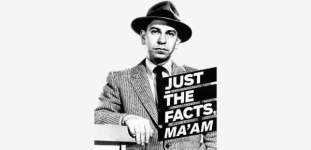
A. What are facts? Facts are the truthful answers to a reporter’s 5 key questions: who, what, when, where, and how. Facts may include names, numbers, dates, definitions, quotes, locations, research findings, historical events, statistics, survey and poll data, titles and authors, pronouns, financial data, institution names and spellings, and historical or biographical details attributed to anyone or anything. Facts are checkable.
B. What is factchecking? Factchecking is the process of confirming the factual accuracy of certain statements or claims, in order to create and share accurate, evidence-based media that relies on high-quality, reliable primary and secondary sources.
C. What kinds of facts do people often get wrong? The most frequent mistakes occur in the spellings of names and institutions, and the attribution or wording of quotes. These errors can be relatively harmless — for example, a throwaway remark about Ben Franklin. Or they can be devastating — for example, listing the wrong person in a breaking news article about a bombing.
While the majority of factual errors are probably not nefarious, there are instances in which people may deliberately hide important facts or introduce inaccuracy. For journalists in these situations, three maxims are useful in finding the facts: ‘follow the money’, ‘consider the source’, and ‘who benefits?’ Remember, a reporter’s job is to find and share the facts that matter, even if people don’t like it.
D. Facts are only as good as their sources. There are two main types of sources: primary sources and secondary sources. Primary sources may include people, transcripts, videos, visitor logs, raw data, peer-reviewed scientific studies, recorded interviews, your own original research, and in-person observation. Secondary sources may include newspaper articles, magazine articles, and books. (Important note: unlike magazines, many books are not factchecked! If you’re using a book as a source, look for a bibliography or notes to track down an author’s sources, and then re-report if needed.)
As with all sources, watch out for inaccuracy, outdated information, and unconscious bias (for example, avoid disproven studies, or articles that talk about people ‘looting’ vs ‘finding’ and ‘rioting’ vs ‘protesting’). Avoid spreading inaccuracy, outdated information, or unconscious bias. Instead, try to increase the world’s supply of truth by shining a light on facts that matter.


 www.bbc.co.uk
AI-generated content is getting scarily good, but it still leaves "digital fingerprints." Here’s how to spot them:
www.bbc.co.uk
AI-generated content is getting scarily good, but it still leaves "digital fingerprints." Here’s how to spot them:
Think Before You Link
Here is a breakdown of how to sharpen your "BS detector" and keep your posts moderator friendly and prevent the spread of lies and disinformation.
A. What are facts? Facts are the truthful answers to a reporter’s 5 key questions: who, what, when, where, and how. Facts may include names, numbers, dates, definitions, quotes, locations, research findings, historical events, statistics, survey and poll data, titles and authors, pronouns, financial data, institution names and spellings, and historical or biographical details attributed to anyone or anything. Facts are checkable.
B. What is factchecking? Factchecking is the process of confirming the factual accuracy of certain statements or claims, in order to create and share accurate, evidence-based media that relies on high-quality, reliable primary and secondary sources.
C. What kinds of facts do people often get wrong? The most frequent mistakes occur in the spellings of names and institutions, and the attribution or wording of quotes. These errors can be relatively harmless — for example, a throwaway remark about Ben Franklin. Or they can be devastating — for example, listing the wrong person in a breaking news article about a bombing.
While the majority of factual errors are probably not nefarious, there are instances in which people may deliberately hide important facts or introduce inaccuracy. For journalists in these situations, three maxims are useful in finding the facts: ‘follow the money’, ‘consider the source’, and ‘who benefits?’ Remember, a reporter’s job is to find and share the facts that matter, even if people don’t like it.
D. Facts are only as good as their sources. There are two main types of sources: primary sources and secondary sources. Primary sources may include people, transcripts, videos, visitor logs, raw data, peer-reviewed scientific studies, recorded interviews, your own original research, and in-person observation. Secondary sources may include newspaper articles, magazine articles, and books. (Important note: unlike magazines, many books are not factchecked! If you’re using a book as a source, look for a bibliography or notes to track down an author’s sources, and then re-report if needed.)
As with all sources, watch out for inaccuracy, outdated information, and unconscious bias (for example, avoid disproven studies, or articles that talk about people ‘looting’ vs ‘finding’ and ‘rioting’ vs ‘protesting’). Avoid spreading inaccuracy, outdated information, or unconscious bias. Instead, try to increase the world’s supply of truth by shining a light on facts that matter.
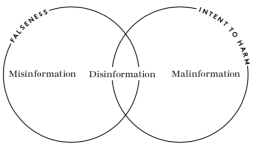
1. Understanding the Enemy: Mis- vs. Disinformation
Not all "fake news" is created equal. Understanding the intent helps you react appropriately:- Misinformation: False information shared without harmful intent (like your aunt sharing a fake health tip she genuinely believes is helpful).
- Disinformation: False information created and shared intentionally to deceive, cause harm, or manipulate public opinion. See video below:
2. The Verification Checklist
Before you hit "Share," run through these steps:- Verify the Source: * Credibility:Is it a known news outlet? Check the "About Us" page. Look for a history of corrections.
- Bias: Every source has a lean, but is it extreme? Use tools like Ad Fontes Media or AllSides to see where a source sits on the political spectrum.
- Cross-Reference: Never rely on a single source. If a major event happened, multiple reputable outlets (AP, Reuters, BBC) will be reporting on it. If only one obscure blog has the "scoop," be skeptical.
- Analyze the Claim: Is the headline designed to make you angry or scared? Clickbait often uses "loaded language" to bypass your logic and trigger your emotions.
3. Looking for Evidence & Context
A claim without a source is just a rumor.- Check the Links: Does the article actually link to the studies or documents it mentions?
- Context Matters: Sometimes a quote is real, but it’s been stripped of the sentences around it to change its meaning. Always look for the full transcript or video.
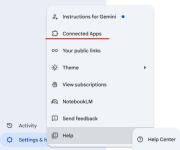
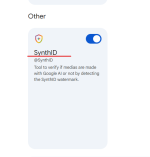
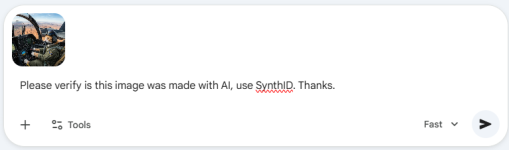
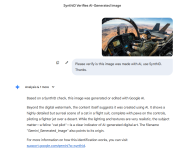
4. Spotting "Synthetic" Media (AI & Deepfakes)
How to identify AI-generated videos online
BBC Verify shares tips and tricks on how to spot AI-generated videos circulating online.
www.bbc.co.uk
- For Images: * The Details:Look at hands (too many fingers?), teeth (too many or blurry?), and jewelry (earrings that don't match).
- Backgrounds: AI often struggles with text in the background or architectural logic (stairs leading to nowhere).
- For Videos (Deepfakes): * Unnatural Blinking:Does the person blink normally?
- Skin Texture: Does the skin look too smooth or "plastic"?
- Audio Mismatch: Watch the mouth closely—do the lip movements perfectly match the sounds?
5. How to Stop the Spread
If you find a post that is false:- Don’t Engage: Commenting "this is fake" can actually boost the post in the algorithm.
- Report It: Use the platform’s reporting tools for "False Information."
- Share the Truth: Instead of sharing the fake post, share a link to a verified fact-checking site (like Snopes or PolitiFact) that debunks it.
Think Before You Link
1. Always apply the "C.R.A.P." TEST
Before sharing, ask yourself:- Currency: When was this posted? Old news is often shared as "new" to stir up trouble.
- Reliability: Does the site have an "About" page? Do they cite their sources?
- Authority: Is the author an expert or a random account with a bunch of numbers in their name?
- Purpose: Is this meant to inform, or is it trying to sell me something or make me angry?
2. THE 3-SOURCE RULE
Never trust a "bombshell" that only appears on one website.- Search the headline: If it’s true, at least three major, independent news organizations (e.g., AP, Reuters, BBC, Wall Street Journal) should be reporting it.
- Check Fact-Checkers: Search the claim on Snopes.com, PolitiFact.com, or FactCheck.org.
3. SPOTTING AI & SYNTHETIC MEDIA
AI makes mistakes. Look for these "glitches":- The Hands & Ears: Look for missing fingers, merged hands, or earrings that don't match.
- The Eyes: Does the person have a "dead" stare? Do they blink naturally?
- The Background: Look for "melting" objects, nonsensical text, or blurry edges where a person's hair meets the background.
- The Audio: Listen for "robotic" pauses or a metallic tingle in the voice.
Last edited: