Flight Simulations

Combat​

The MiG-19 performs well against other DCS platforms such as the F-86 Sabre, MiG-15 and other fighters of the period. Even going head to- head with more advanced aircraft like the F-5 Tiger II and MiG-21 can end with good results. Tangling with more capable fourth generation fighters such as the F-15, F-16, Mirage 2000 and MiG-29 leaves the MiG-19 at a decided disadvantage as their sensors, weapons, speed and manoeuvrability combine to make life difficult over a more modern battlefield. Similarly, the MiG-19 does not have the self-protection chaff, flares and jammers that would make it survivable against IR- and radar-guided surface-to-air missile threats. RAZBAM has modelled the RP-5 radar with tracking and search capabilities. The maximum search range is 12km and the maximum lock range is 4km. In the Radar Target Lock mode (within 10 degrees and 4km) a radar contact and range indicator will appear on the RP-5 radar reflector glass. Keep in mind, the radar does not pass any guidance to the air-to-air missiles, it is merely an aid to get you into position to utilise your weapons and detect targets in poor weather. There are several radar modes and different components can be turned on and off to help find targets based on your altitude, as well as an antijamming mode that filters out jamming to provide a fuzzy but useable radar return.
Air-to-air weaponry consists of K-13A / R-3S ‘Atoll’ infrared missiles with a range of 2-7km. The radar can provide range information but the missiles are easy enough to use – turn them on and when the tone in your headset rises to a growl, fire the missiles. They are only effective when fired at the rear aspect of targets where the heat signature is the greatest. S-5M unguided rockets can also be used against air targets but their accuracy makes effective use difficult. The fearsome 30mm cannons can be used in both optical and radar modes. Using the radar will provide target distance indications and the ASP-5 Gunsight Gyro can provide steering corrections based on angular velocity.
For ground attacks, S-5M rocket pods provide a good punch against lightly armoured targets and can be fired with reasonable accuracy. Much harder is the delivery of FAB 100 and 250 bombs that require a lot of practice with delivery profiles and gunsight settings to achieve accuracy. Finally, the NR-30 30mm cannons are also useful for precise strafing attacks but the limited amount of ammunition restricts the number of attack runs you can perform.
MIG-08.jpg

The RP-5 Izumrud (Emerald) radar has a maximum detection range of 10-12km for large aircraft and 9km for fighter-sized aircraft.

Conclusion​

The RAZBAM MiG-19P is a wonderful step back in time that gives one a real appreciation of the workload and challenges that Cold War-era pilots faced. Whether you perform ground attack or interceptor missions in the MiG-19, you will definitely earn your victories if you survive long enough to return to base. Keep in mind the MiG-19 is still in Early Access, meaning that features are being refined and added with each patch. As the product ships now, Instant Action missions are available, with Single Missions and Campaigns in development.

PC Pilot Verdict​

At a glance: An impressive simulation of the MiG-19 with fantastic graphics, excellent tutorials, deep systems and an exciting flight model.
Developer: RAZBAM
Download Price: $49.99 (£38 approx)
Website: www.digitalcombatsimulator.com
Flight Model: Excellent
Graphics: Excellent
Documentation: Excellent
Systems: Excellent
PC Pilot Score: 95


System requirements​

Minimum system requirements (LOW graphics settings): OS 64-bit Windows 7/8/10; DirectX11; CPU: Intel Core i3 at 2.8GHz or AMD FX; RAM: 8GB (16GB for heavy missions); Free hard disk space: 60GB; Discrete video card NVIDIA GeForce GTX 760 / AMD R9 280X or better; requires internet activation.
Recommended system requirements (HIGH graphics settings): OS 64-bit Windows 8/10; DirectX11; CPU: Core i5+ at 3+ GHz or AMD FX / Ryzen; RAM: 16GB (32 GB for heavy missions); Free hard disk space: 120GB on Solid State Drive (SSD); Discrete video card NVIDIA GeForce GTX 1070 / AMD Radeon RX VEGA 56 with 8GB VRAM or better; Joystick; requires internet activation.
Recommended VR systems requirements (VR graphics settings): OS 64-bit Windows 8/10; DirectX11; CPU: Core i5+ at 3+ GHz or AMD FX / Ryzen; RAM: 16GB (32GB for heavy missions); Free hard disk space: 120GB on Solid State Drive (SSD); Discrete video card NVIDIA GeForce GTX 1080 / AMD Radeon RX VEGA 64 or better;
 
Flown/played all of them - starting at age 5 on the orignal Microsoft flight simulator. To unknowns like Su-25 frog foot, TFX then Falcon series and the epitome in Falcon 4.

Still do today
Have winwing F-16 block 60 throttle - one Orion 2 regular with a F-18 grip for regular flights and a Orion 2 MFFSB(pressure sensor) with F-16 grip for the viper. MFDs and a HP Reverb for VR.

Unfortunately, never got into multiplayer.
I have the winwing orion hotas max (f15ex throttle and 16stick with shaker kit). I got quest 3 for the vr and somewhat regretting not getting g2. My 7900xtx struggles a bit with encoding/decoding for quest 3.
 
mig-19_9.jpg


mig-19_11.jpg

mig-19_12.jpg

mig-19_13.jpg

mig-19_14.jpg

mig-19_1.jpg


PreviousNext


Originally published in PC Pilot Magazine​


THUNDER IN THE AIR​

  1. Thunder in the Air
By Richard Benedikz 17th December 2019
NEWS
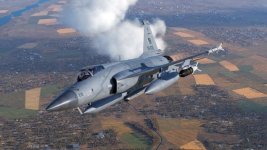
The DCS: JF-17 Thunder by Deka Ironworks is now available for download on the DCS World e-Shop and Steam.
The single-engine, multirole light fighter was jointly developed by AVIC Chengdu and Pakistan Aeronautical Complex (PAC). The maiden flight was made in August 2003, with the first delivery to PAF (Pakistan Air Force) in 2007. Currently, several different blocks of the JF-17s are in service with the Pakistan and Myanmar air forces. On February 27, 2019, the aircraft was tested in actual combat and secured a significant victory by the PAF.
It features a bubble canopy for excellent visibility along with advanced avionics. A KLJ-7 radar provides good air-to-ground capability while a WMD-7 targeting pod searches for targets. Although "Thunder" is small, it is one of the most advanced fighter jets in the DCS World.

Key features of the DCS: JF-17 "Thunder" include:
  • Nonlinear industry-level high fidelity 6DOF rigid-body flight model with real-life aerodynamic coefficients
  • Line-by-line real-life full authority longitudinal fly-by-wire system and lateral/directional control augmentation system with various modes and control law reconstruction on malfunction
  • Detailed aircraft exterior model with faded paint and oil residue
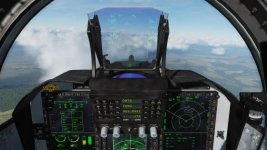
  • 6DOF cockpit. Three large MFCDs with an advanced HOTAS interface
  • Accurately simulated sub-systems: communication and navigation, fire control, store management system, electromechanical management systems, air data, DTC card, warning system, defence system, hydraulic, pneumatic, electrical, environment conditioning, oxygen, external/cockpit light, power plant control, zeroizer, eject seat and g-suit system
  • Failure simulation: the module has over 200 system malfunctions and more than 100 damage partitions covering near 100 on-board devices; mutual malfunction effects between systems are also simulated
  • KLJ-7 radar can track 10 targets and attack two targets at the same time. KLJ-7 can also search/track surface (ground and sea) moving targets
  • Advanced stand-off attack capability: including LS-6 and GB-6 glide bombs, C-802AK anti-ship missile and CM-802AKG Man-In-the-Loop (MITL) missile
  • WMD-7 targeting pod can be used to search/track surface targets, identify air targets and provide guidance for laser-guided weapons
  • Advanced electronic warfare system: including chaff/flare dispense systems (OESP), KG-600 self-protect jamming pod that can locate radiation source and missile approach warning system (MAWS) installed on the tail
  • On-board datalink supports battlefield situation sharing between JF-17s and between AWACS
  • Detailed radio command options for ground crew interactions
  • Player-friendly configurations in Special Option
  • Air to air refuelling capability (Plan to add later)
  • Campaigns for JF-17 in the Caucasus theatre (TBD).
PreviousNext

Topics​

Read more about

Originally published in PC Pilot Magazine​

DCS-2019-12-01-16-05-30-622.jpgdcs-2019-12-01-16-40-11-868_0.jpg
 

THUNDER IN THE AIR​

  1. Thunder in the Air
By Richard Benedikz 17th December 2019
NEWS
The DCS: JF-17 Thunder by Deka Ironworks is now available for download on the DCS World e-Shop and Steam.
The single-engine, multirole light fighter was jointly developed by AVIC Chengdu and Pakistan Aeronautical Complex (PAC). The maiden flight was made in August 2003, with the first delivery to PAF (Pakistan Air Force) in 2007. Currently, several different blocks of the JF-17s are in service with the Pakistan and Myanmar air forces. On February 27, 2019, the aircraft was tested in actual combat and secured a significant victory by the PAF.
It features a bubble canopy for excellent visibility along with advanced avionics. A KLJ-7 radar provides good air-to-ground capability while a WMD-7 targeting pod searches for targets. Although "Thunder" is small, it is one of the most advanced fighter jets in the DCS World.

Key features of the DCS: JF-17 "Thunder" include:
  • Nonlinear industry-level high fidelity 6DOF rigid-body flight model with real-life aerodynamic coefficients
  • Line-by-line real-life full authority longitudinal fly-by-wire system and lateral/directional control augmentation system with various modes and control law reconstruction on malfunction
  • Detailed aircraft exterior model with faded paint and oil residue
  • 6DOF cockpit. Three large MFCDs with an advanced HOTAS interface
  • Accurately simulated sub-systems: communication and navigation, fire control, store management system, electromechanical management systems, air data, DTC card, warning system, defence system, hydraulic, pneumatic, electrical, environment conditioning, oxygen, external/cockpit light, power plant control, zeroizer, eject seat and g-suit system
  • Failure simulation: the module has over 200 system malfunctions and more than 100 damage partitions covering near 100 on-board devices; mutual malfunction effects between systems are also simulated
  • KLJ-7 radar can track 10 targets and attack two targets at the same time. KLJ-7 can also search/track surface (ground and sea) moving targets
  • Advanced stand-off attack capability: including LS-6 and GB-6 glide bombs, C-802AK anti-ship missile and CM-802AKG Man-In-the-Loop (MITL) missile
  • WMD-7 targeting pod can be used to search/track surface targets, identify air targets and provide guidance for laser-guided weapons
  • Advanced electronic warfare system: including chaff/flare dispense systems (OESP), KG-600 self-protect jamming pod that can locate radiation source and missile approach warning system (MAWS) installed on the tail
  • On-board datalink supports battlefield situation sharing between JF-17s and between AWACS
  • Detailed radio command options for ground crew interactions
  • Player-friendly configurations in Special Option
  • Air to air refuelling capability (Plan to add later)
  • Campaigns for JF-17 in the Caucasus theatre (TBD).
PreviousNext

Topics​

Read more about

Originally published in PC Pilot Magazine​

View attachment 21102View attachment 21103
do you sim, Fatman Ji ?

casual simmer here, Flaming Cliffs 3 me easy anti arty missions on the basic A-10 is fun ! The full spec A-10C is quite a bit to get into.
 
do you sim, Fatman Ji ?

casual simmer here, Flaming Cliffs 3 me easy anti arty missions on the basic A-10 is fun ! The full spec A-10C is quite a bit to get into.
Casual now but avid when younger
 
Casual now but avid when younger
ulta hisaab !

now is when I imagine you have both the time and the resources to pour into the hobby !

I have my heart set on the Viper but doesn't justify a purchase, not when I'm sitting on 3 proper full sims .. Ka-50 Black Shark, A-10C and the Mig-21 .. take a lot of study time, these.

mast scene, but.. hobby ho toh aisi :D
 
ulta hisaab !

now is when I imagine you have both the time and the resources to pour into the hobby !

I have my heart set on the Viper but doesn't justify a purchase, not when I'm sitting on 3 proper full sims .. Ka-50 Black Shark, A-10C and the Mig-21 .. take a lot of study time, these.

mast scene, but.. hobby ho toh aisi :D
Sharma ji you are incorrigible. That's why I like you 😍. 😆
 

FLIGHT SIM AIRPORTS - PART I​

  1. Aviation Features
  2. Flight sim airports - Part I


By Len ‘Flightdoc’ Hjalmarson 17th October 2022
FEATURE

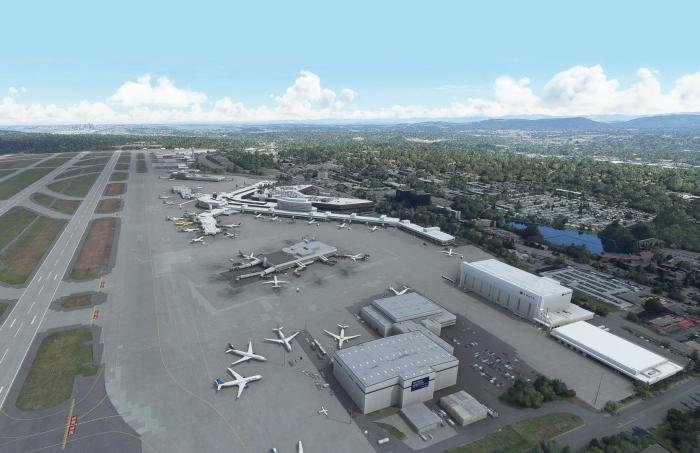
Asobo’s KSEA Seattle-Tacoma Airport​

Every iteration of Microsoft Flight Simulator brings new features, in part because of the evolution of the hardware which enables us to fly. The latest release was no different and this simulation has come a long way in ten years.
Asobo's Seattle-Tacoma
Asobo's Seattle-Tacoma Key Publishing
After not flying for four or five years, I walked into an office where someone was flying Microsoft Flight Simulator (MSFS) late in 2020 and wondered if I was seeing a movie or a documentary. New GPUs and the supporting APIs enable incredible features, and immersion has been taken to a new level in the latest iteration of the sim. It’s an earth and sky simulator as much as an aircraft and flight simulator. And with some of the aircraft now being added, it’s also an avionics and systems simulator.
At higher levels of challenge, it’s incredibly immersive. Flying an A320 on a precision landing in poor weather, one can really break into a sweat. If you have added Navigraph charts and learned the intricacies of the flight computer, your gate-to-gate time has increased as has the fun. Yet that immersive experience can quickly be lost when departing from the gate of a default Asobo airport.
Let’s face it, even a basic Asobo airport in MSFS now is better than most of the last generation. But when the new features and possibilities of this next-generation simulation are truly leveraged, it becomes difficult to distinguish the simulation from reality. Let me offer just a few snapshots of what I have noticed.
I’ve seen realistic ground workers chatting near a gate or power unit, tyre marks around gates in dry or in wet weather that look absolutely real, airport interiors modelled to fine detail, including animated passengers, LED displays showing arrivals and departures and moving escalators.
FlyTampa’s CYYZ (Toronto Pearson International) gate area features an obsessive amount of work and looks used.
FlyTampa’s CYYZ (Toronto Pearson International) gate area features an obsessive amount of work and looks used. Key Publishing
I’ve seen night lighting and transparent glass with reflections of near objects that are absolutely realistic.
I’ve also seen Visual Docking Guidance Systems (VDGS) and control tower views that offer a 360-degree view of the real-time action at a given airport.
However, there’s a catch. If you want this level of detail, you have to add third-party airports. The designs I have been looking at are very good and this series will take you there. Many MSFS airport builders are obsessive to the extreme and are using their best talents to take us there.
We’ll begin by exploring a default Asobo airport to create a baseline. In that process, we’ll set out a standardised way of measuring certain prominent design features: overall texture quality, lighting, gates and jetways, buildings accurate to the real airport, lines and signage and weathering. And we’ll consider special features including operating trams and trains, realistic interiors, animations and the new VDGS systems. So, let’s taxi to the runway at KSEA (the ICAO (International Civil Aviation Organization) code for Seattle–Tacoma International Airport).
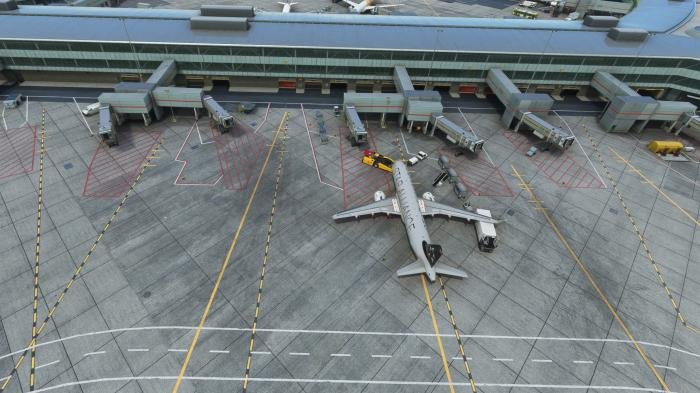
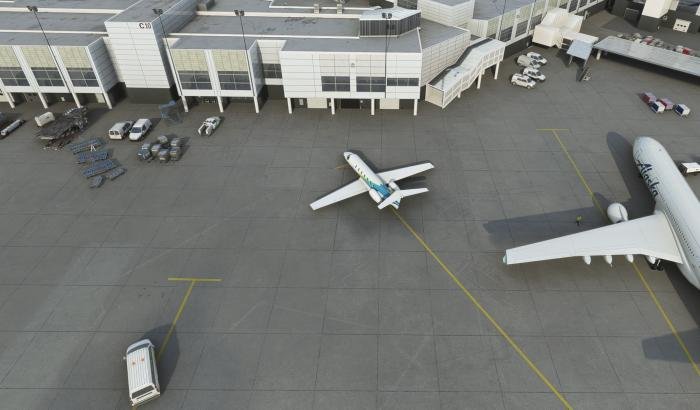
Asobo’s KSEA (Seattle-Tacoma Airport) gate area looks too clean.
Asobo’s KSEA (Seattle-Tacoma Airport) gate area looks too clean. Key Publishing

Asobo’s KSEA Seattle-Tacoma Airport​

The first thing I notice on approach at Sea-Tac is some lovely detail on the PAPI (Precision Approach Path Indicator) system. During my taxi time, however, I begin to notice the missing lines. Moreover, I’m not seeing much wear or rubber on the taxiways. Textures are too clean. When I arrive at the gate that impression continues; I don’t think it ever rains in this version of Seattle. Where is the weathering? And the glass in the terminal face is reflective but looks fake. There is no transparency, and the windows are too uniform and boxy.
Around the gate area the yellow lines are too crisp, and the tarmac looks almost unused. The guidelines for vehicle traffic have disappeared and the white lines that restrict where ground vehicles and carts and the like will be parked are similarly missing.
On the other hand, the layout of the airport is mostly right. Comparing satellite imagery with the in-game buildings and taxiways, they are the right size and location. However, roof detail is often lacking, with no ventilation units or air conditioners. Certain features are also missing from some parts of the terminal, such as the covered walkway from the north ramp area.
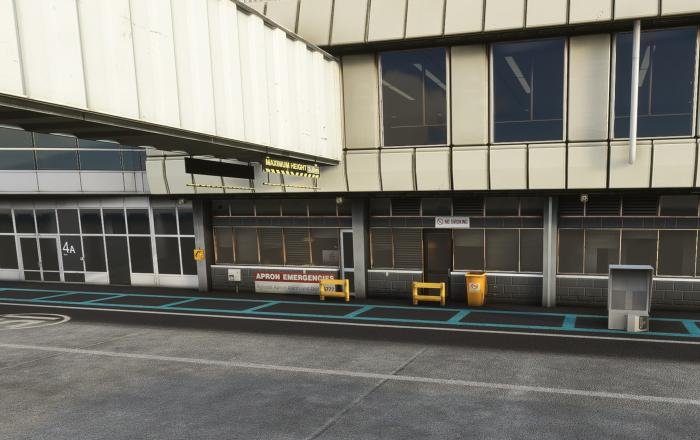
Gates are also missing at some parts of the terminal along with some other details. Small red or yellow signs announce warnings or instructions around doors and gates at the actual airport but not here.
Details at gates are sparse and jetways at KSEA are the Asobo default. They have basic details but lack features that appear in nearly every upgrade. They lack the weathering seen on better jetways and the animations are rather weak, having a nasty habit of intruding through the aircraft skin.
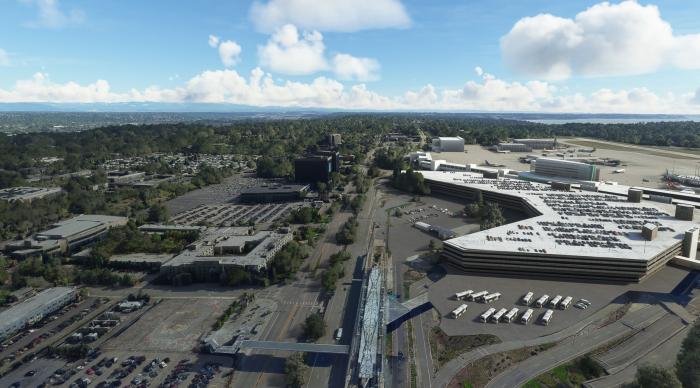
The passenger side at KSEA (Seattle-Tacoma Airport).
The passenger side at KSEA (Seattle-Tacoma Airport). Key Publishing
The passenger side of the terminal has been neglected. Some might say: "Who cares? It's not like we park aircraft there or even taxi there. It’s not Microsoft Passenger Simulator, after all?"
But for a sense of immersion when you are low and slow in a C172, that detail becomes critical. Or if you happen to be in drone view taking screenshots, you want to see a realistic and familiar view. What if the control tower views we are seeing appear now become a standard feature? With that elevated 360 perspective, you will need those areas added to see the kind of design detail that is now appearing at CYYZ (Toronto Pearson International), NZAA (Auckland International Airport), EBBR (Brussels Airport) and others. At KSEA, however, the passenger side has received virtually no attention, depending mostly on default satellite mapping.
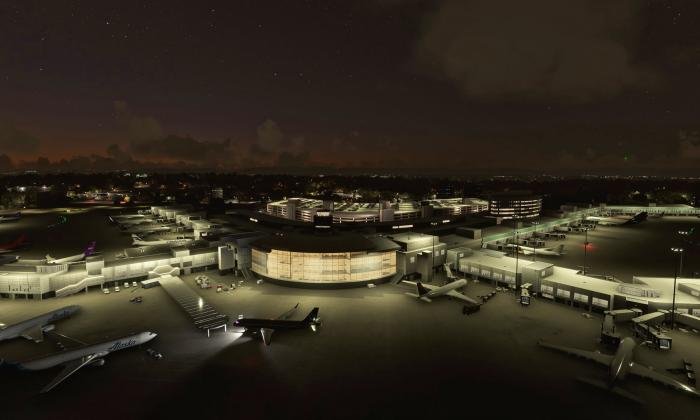
A night image of KSEA.
A night image of KSEA. Key Publishing
Night lighting, on the other hand, is okay. It’s just warm enough, not the glaring white that appears at some airports. But it only looks decent until you get near to the terminal buildings, then the lack of transparency is noticeable and detracts from that sense of ‘being there.’ And it’s even worse if you have newer airport expansions where the lighting is realistic. When you return to these Asobo defaults you feel like you are in a cartoon. In daylight, KSEA is bearable, at least if you are not frequenting the real-world airport.
Other problems soon show up. Aircraft are taxiing at odd places and don’t follow the lines. The tower is not going to like this and neither are you if you attempt to follow the rules when the AI does not. And it’s really annoying when you pull up to your gate only to find a transit bus pulling up beside you at the next gate.

Hardware test​

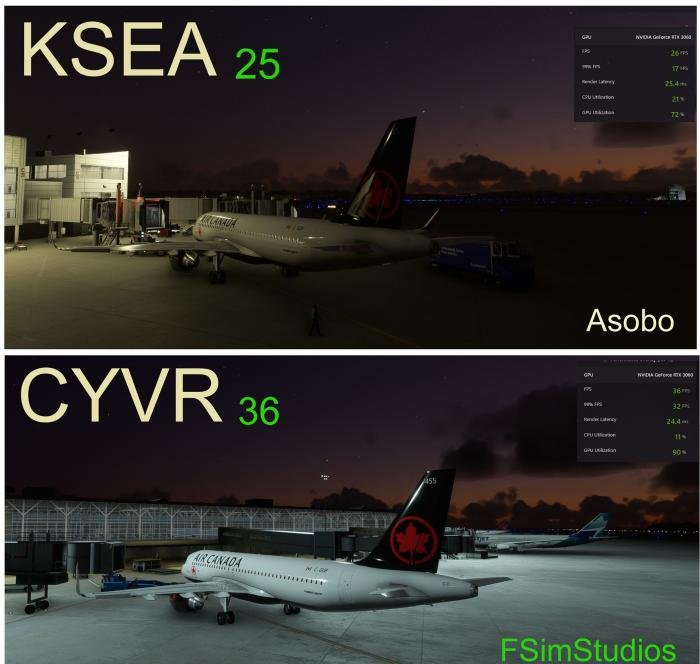
Finally, I did some hardware testing to see how framerates compare at these default MSFS airports versus the beautiful third-party airports currently arriving on the scene; the results surprised me. In order to make a reasonable comparison, here are my settings. I am running on full ULTRA graphics settings at 2560x1440. My system is an AMD Ryzen 5900 with 16MB DDR4 at 3600MHz. The GPU is an EVGA RTX 3060 with 12GB of RAM.
NZAA (Auckland International Airport), at the gate.
NZAA (Auckland International Airport), at the gate. Key Publishing
 
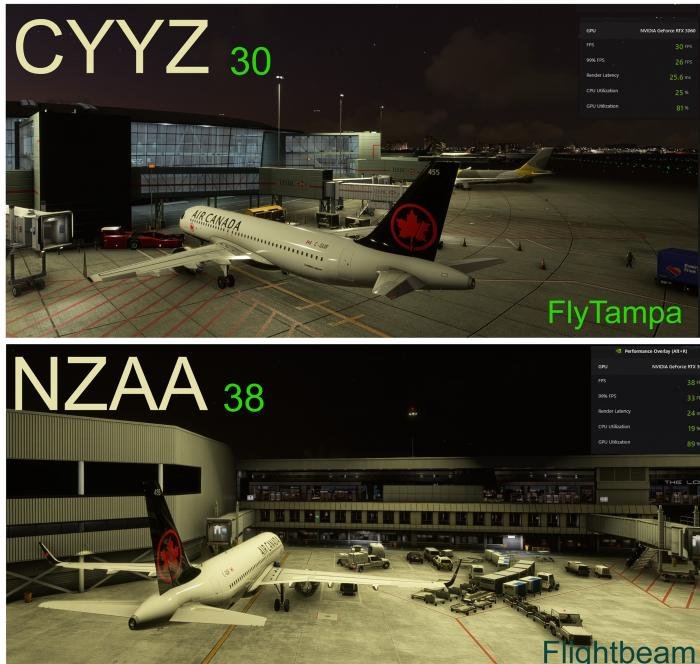
The framerate at KSEA at the gate in the FlyByWire A320 is 25FPS, at CYVR (Vancouver International Airport) from FSim Studios, it’s 36FPS. At CYYZ (Toronto Pearson International) from FlyTampa, it’s 30FPS while at NZAA (Auckland International Airport) from Flightbeam, it’s 38FPS. That’s surprising, right?
The default and very basic Asobo KSEA offers the worst framerate of any of the airports I am testing. The most likely reason is lack of optimisation and failure to take advantage of the newer capabilities of graphic design and graphics hardware.
So, when you find that airport that you really want to add to MSFS, chances are it will ease your hardware burden and not increase it.
For comparison, here are three third-party airports and their relative frame rates, compared with Asobo’s KSEA.
For comparison, here are three third-party airports and their relative frame rates, compared with Asobo’s KSEA. Key Publishing
And here are CYYZ and NZAA
And here are CYYZ and NZAA Key Publishing

Conclusion​

Let me summarise what we have seen at KSEA and offer a rating. Let’s break it down like this:
Imaging – texture quality, look and feel, tarmac and gate details including lines and tyre marks, lighting and glass (animations we will rate under Realism).
Score: 6/10
Enhancements – Additional Points of Interest (POIs) or area enhancement, unique features, such as working trams and trains, new views like the control tower, improved jetways, opening hangars and VDGS system.
Score: N/A
Realism – Terminal interiors, animations (usually people), signage in detail, static aircraft and objects, gates and buildings where they should be. Runways are accurate. The vehicle and passenger side of the terminal properly modelled.
Score: 4/10
Overall KSEA score: 4/10
That’s all for Round 1. In part 2 of this series, starting on page 54, we will look at Pearson (CYYZ), FlyTampa’s offering for international fliers.
It’s evident from this beginning that PC pilots of all stripes have a lot to look forward to as our list of expansion airports grows.
By Len ‘Flightdoc’ Hjalmarson

Topics​

Read more about
Thumbnail

Originally published in PC Pilot Magazine​

 
Didn’t know where to post this, but feel this is as good as any.

Has anyone made or bought components to make realistic JF-17 simulators, so we can have more young potential pilots, in Pakistan and Abroad (for potential customers).

These simulators could also be good for training future drone warfare.

Couple this with the new Apple VR headset, it could more realistically simulate the experience.
First, look up the Ukrainian Bradley vs Russian tank fight. The gunner said his video game helped him in the fight.

Second, when I was active duty, I logged some hrs in the F-16 simulator. What the simulator, and to a good extent video game, do is give you TIME to think about what you did. By time I mean your sortie in the simulator can be paused and your actions analyzed. Simulator cannot give you muscle memory but mental memory on how to respond to which situation. Now, the simulator does have a cockpit that is at least %85 the same as the actual airplane cockpit, so you would be able to move and flip switches close to actual flight. But what the simulator, at this technology, lacks are the total physical stresses that actual flight produce, and THAT is where your true muscle memory develops.

Roller coasters produce the same g-rating as the Space Shuttle launch -- 4g. At this point, your vision is not yet affected, aka 'greyout'. But your body is affected. The simulator cannot produce the increased strain you need, even at 4g, to move your arm to reach a certain panel in the cockpit. Even with HOTAS, greater than 5g will move your shoulders, back, and core, and that will affect your grips on the stick on throttle, and that will affect how quickly you can move those little fingers to change mode from ground-air to air-air.

So, what are we to make of simulators? They are useful, we know that, but now with testimonies from Ukraine, they do work in helping to RETAIN knowledge, if not train muscle memory. UAV pilots do not need as much muscle memory as manned airplanes do, so for UAVs, simulators are critical because the mental aspects of flight are all that you have, whereas, with manned airplane, there are mental and physical stresses. We need to understand the utility and the limits of simulators.
 

A HISTORY OF MILITARY FLIGHT SIMULATION – PART 2​

  1. Aviation Features
  2. A History of Military Flight Simulation – Part 2


By Leonard ‘Flightdoc’ Hjalmarson 10th August 2023
FEATURE

Part II – The journey continues...​

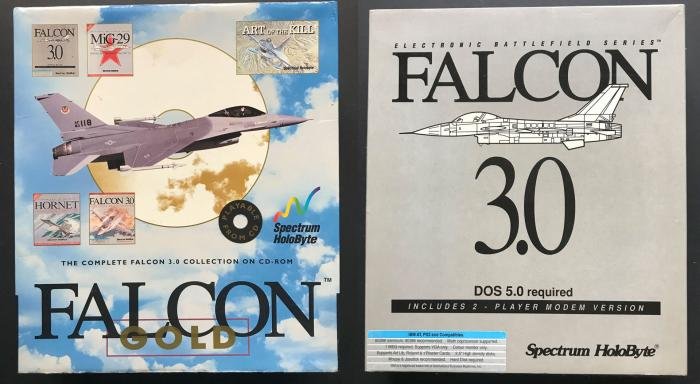
1991 saw the release of 11 military flight sims for the PC. Of all the titles, Falcon 3.0 heralded a new generation in simulation technology.
Falcon 3.0 heralded a new generation in simulation technology.
Falcon 3.0 heralded a new generation in simulation technology. Leonard ‘Flightdoc’ Hjalmarson

Enter Falcon 3.0​

Falcon 3.0 had the first dynamic campaign system, involving the player in an ongoing battle in a persistent world, with the forward line shifting with the fortunes of war. Falcon 3.0 was probably the first simulation to have a padlock view, simulating the player turning his head to keep a fix on the bandit.
AI wingmen reached a new level of sophistication. They helped in combat and even warned the player of threats. Damage models had begun to improve and Falcon 3’s mission designer allowed the creation of complex combat scenarios.
The inclusion of networking features gave birth to virtual squadrons and a true flight simulation community, even before the internet. Falcon 3.0 also featured a working Air Combat Manoeuvring Instrumentation (ACMI) visual flight recorder, allowing the player to examine his manoeuvres after the mission from a variety of angles and perspectives. Finally, Falcon offered a high-fidelity flight model which could be activated on the top-end hardware of the time, a 486/33 or higher.

Thrustmaster controllers​

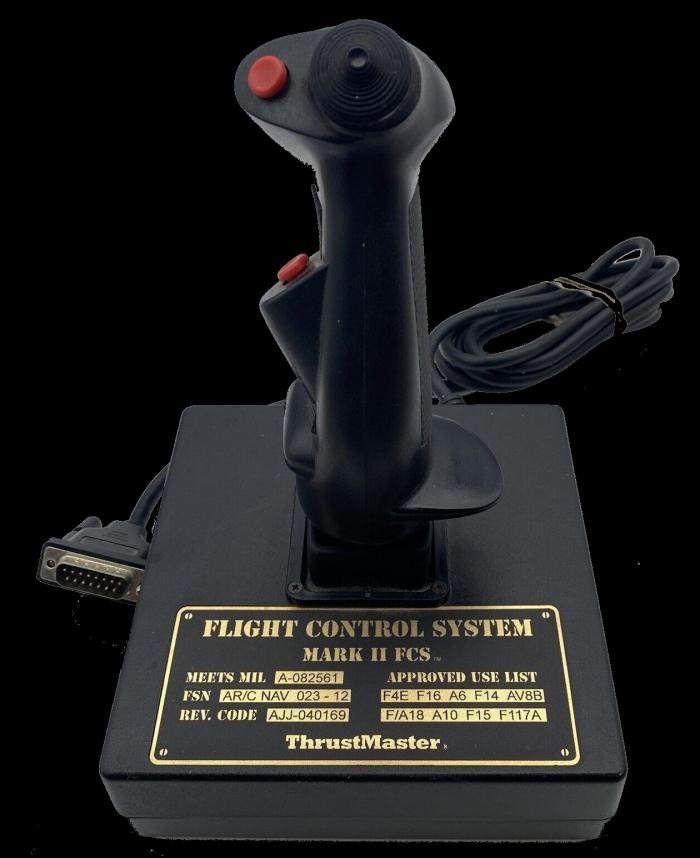
Somewhere around this time, Thrustmaster released its Flight Control System (FCS) and Weapon Control System (WCS) Hands-On Stick and Throttle (HOTAS) controllers. The FCS, based on the stick used in the F-4 Phantom, was the first to include a ‘Hat’ (point-of-view) switch. Thrustmaster was founded by Buzz Hoffmann, an ex-USAF fighter pilot, around 1990 with the idea of creating high-end controllers for the growing flight simulation industry.
Real pilots don’t have to worry about hitting keys on a keyboard when they are in combat. Taking one’s eye off the enemy is a good way to get killed. Buzz knew from experience that good controllers could make a huge difference to immersion in the virtual pilot experience and he began to develop controllers that looked and felt like the real thing.
The Thrustmaster FCS Mark II joystick.
The Thrustmaster FCS Mark II joystick. Leonard ‘Flightdoc’ Hjalmarson

The year - 1992​

1992 saw the release of nine new titles for the PC and a shift to prop combat. These included: Dynamix’s classic Aces of the Pacific (AOTP), MicroProse’s B-17 Flying Fortress and Rowan Software’s Reach for the Skies – the latter complete with Gouraud Shading (used in computer graphics to produce continuous shading of surfaces).
AOTP demonstrates the increasing production effort directed towards combat flight sims. Damon Slye, head of Dynamix, had a special interest in flight sim products, beginning with the highly successful Red Baron in 1990.
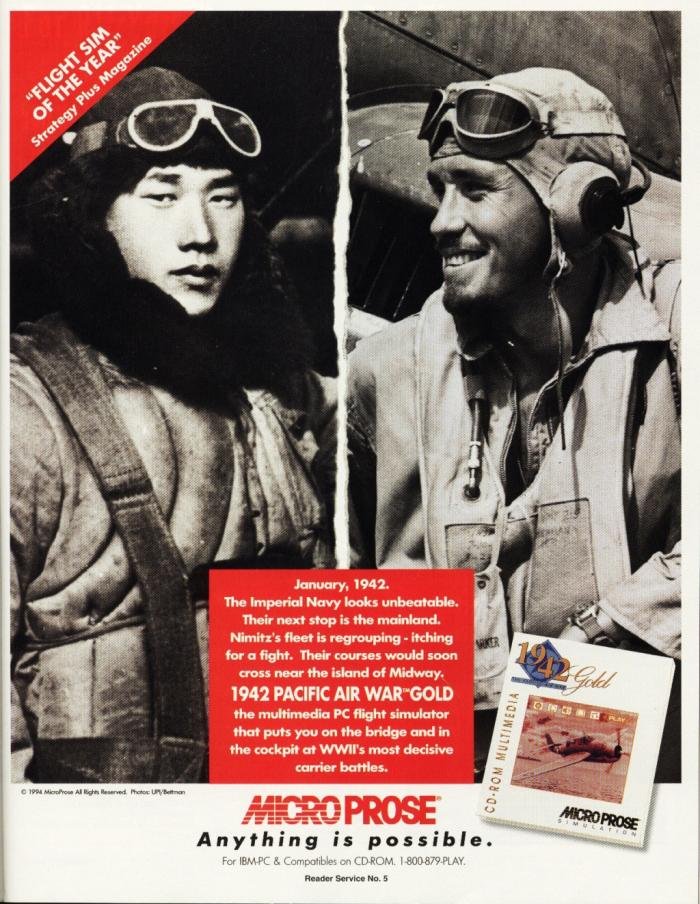
A magazine advert for MicroProse’s 1942: The Pacific Air War Gold Edition from PC Gamer May/June 1994.
A magazine advert for MicroProse’s 1942: The Pacific Air War Gold Edition from PC Gamer May/June 1994. Leonard ‘Flightdoc’ Hjalmarson
AOTP included a beautiful spiral-bound 240-page manual, including colour plates of all the key aircraft in the conflict (25 of which were simulated). The game also featured a mission recorder, allowing the player to fly a mission and record it for later replay. It even allowed you to jump back in at any point during the mission.
As I examined the old AOTP box, I found two leaflets which preserve some of the magic of those years for Dynamix. The first promotes ‘The Sierra Network’, with the new “interactive Dynamix simulator game Red Baron”. TSN (The Sierra Network) is described as “the world’s first electronic entertainment community.”
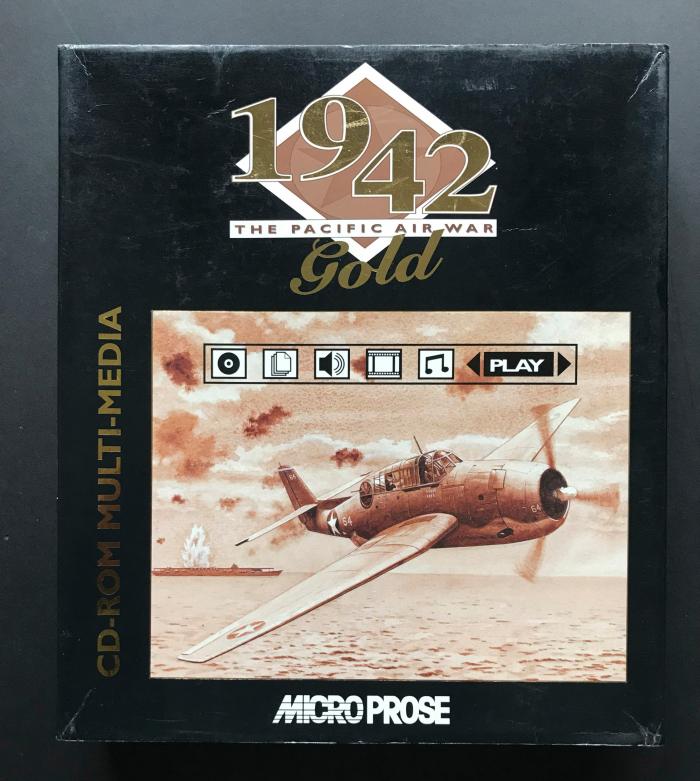
The Box-art for MicroProse’s 1942: The Pacific Air War – Gold Edition.
The Box-art for MicroProse’s 1942: The Pacific Air War – Gold Edition. Leonard ‘Flightdoc’ Hjalmarson

1992-1994​

1992 also saw the release of Novalogic’s Comanche helicopter simulation and MicroProse’s F-15 Strike Eagle III. Novalogic, a new arrival in the simulation field, used a new technology called Voxel Space to produce incredible low-level detail for terrain, creating a tremendous sense of speed. Weaving in and out of canyons was sensational. Strike Eagle III allowed co-op multiplayer front-seat/back-seat gaming and had excellent tutorials. Missions were diverse and challenging, and avionics were detailed.
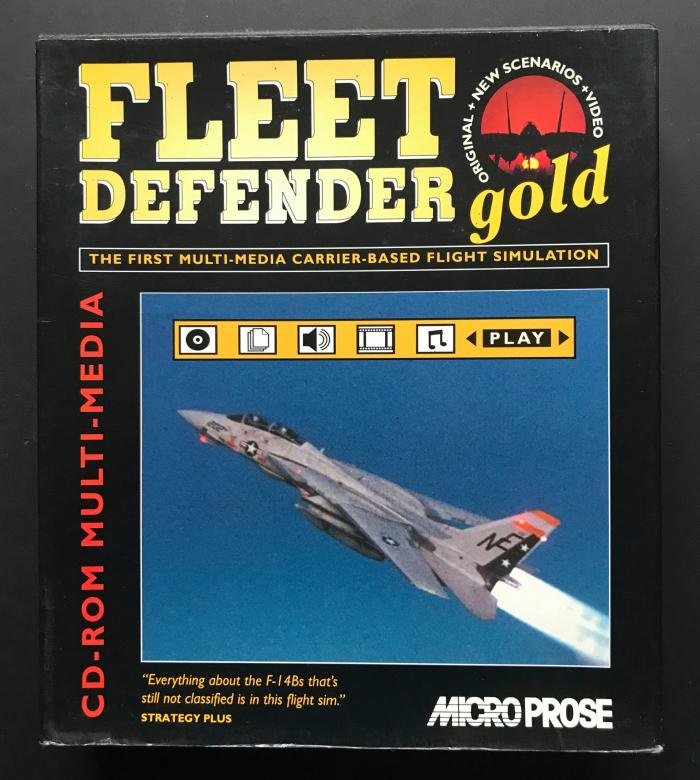
In 1994 MicroProse released Fleet Defender, which modelled both pilot and Weapons Systems Officer (WSO) positions in the F-14 Tomcat. It had a great atmosphere. I remember sweating as I dropped through the clouds and AAA systems were lighting up my screen. Fleet Defender was outstanding for carrier operations, with excellent voice interaction, good wingman control and incredible dawn and dusk lighting. Two manuals detailed weapon systems, tactics and operation of the Tomcat.
In 1994 MicroProse released Fleet Defender. Here we see the box-art for the Gold Edition.
In 1994 MicroProse released Fleet Defender. Here we see the box art for the Gold Edition. Leonard ‘Flightdoc’ Hjalmarson
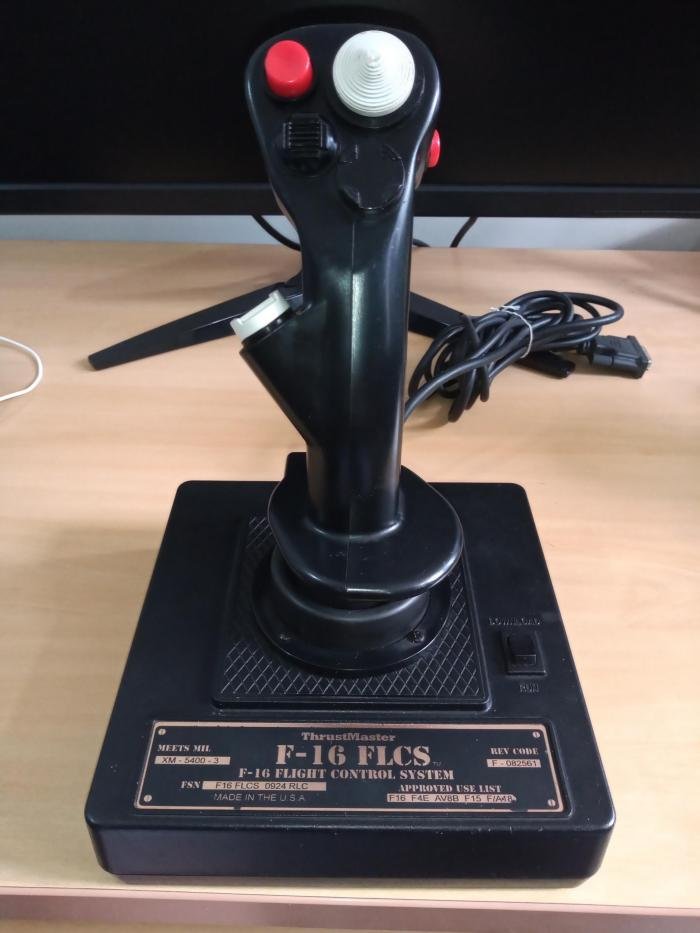
Bill Clinton became US President in 1993, also when Thrustmaster released its F-16 FLCS, a stick I used for years. Only 5,000 were ever made. In that year, there were seven combat flight sim releases for the PC. Dynamix released Aces Over Europe and Spectrum Holobyte released its Hornet add-on for Falcon 3.0. Origin released Strike Commander, with high-detail texture and a scrolling virtual cockpit.
Digital Image Design made its first entry for the PC in 1993 with TFX. TFX required a 486 with 4MB of free memory. Textures were highly detailed and the game featured a UN Commander mode which allowed the player to plan the campaign missions and fly the EF2000, F-22 or F-117.
1993 also saw the release of Tornado, the classic from Digital Integration. With a 330-page manual, this simulation allowed detailed mission planning and sported a dynamic campaign system. It quickly became a huge success as virtual squadrons formed to plan tactics and fly together via modem or Local Area Network (LAN).
Thrustmaster’s F-16 FLCS joystick.
Thrustmaster’s F-16 FLCS joystick. Leonard ‘Flightdoc’ Hjalmarson
 

Users who are viewing this thread

Latest Posts

Back
Top